
Reviewed 2026-10-06
Wedding Studio Review: Is Its Wedding QR Code Service Worth It?
Wedding Studio's QR album, current promotional prices, printed cards and customer evidence reviewed. See the conflicting storage dates to confirm before buying.
Short answer
Wedding Studio is a hosted wedding QR album: guests scan a code and send photos or videos in their browser without an app or account. Its advertised sale prices are $29 for 25 contributing devices, $69 for 100 and $99 for unlimited guests, checked October 5, 2026. The appeal is combining a digital collection with optional printed cards and a photobook. Our verdict: shortlist it if that print-to-album workflow suits you. Confirm the closing date before buying, because its homepage and FAQ give different starting points for the advertised 24-month access period.
WeddingPhoto App publishes this review and sells a competing service. This is a review of public documentation and customer evidence, not a paid-event test. We have not measured upload speed, ordered prints or compared downloaded files byte for byte.
Wedding Studio at a glance
| Decision | Published offer or caveat |
|---|---|
| Guest entry | QR or link; browser uploads without guest signup |
| Media and presentation | Photos, videos, voice messages, slideshow and a timed reveal |
| Albums | Up to five separate albums with their own codes |
| Download | Individual files or a full-resolution ZIP, according to the provider |
| Best fit | A couple who wants guest collection and optional printed keepsakes together |
| Main caveat | Conflicting access-period start dates; limited tiers count uploading devices |
Pricing: album access and printed products are separate
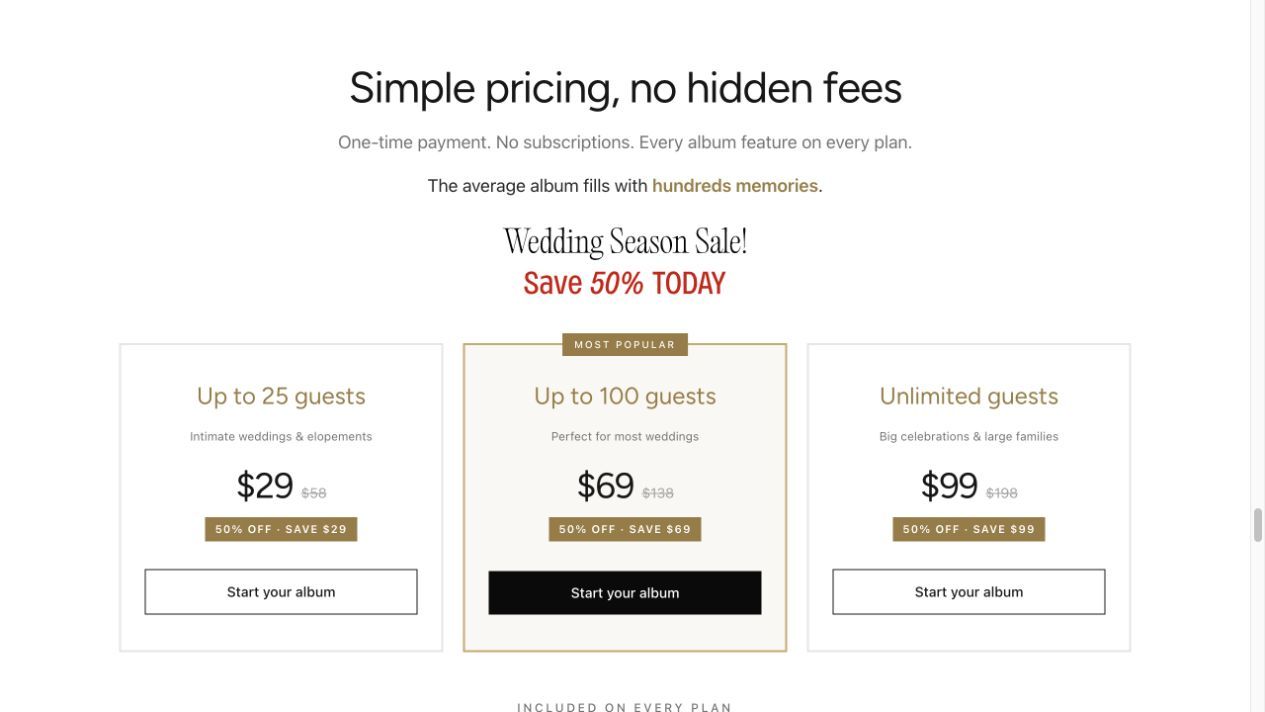
| Purchase | Displayed sale price |
|---|---|
| Album for up to 25 contributing devices | $29 |
| Album for up to 100 contributing devices | $69 |
| Album with unlimited guests | $99 |
| Printed QR cards | From $49, optional |
| 32-page softcover photobook | From $59, optional |
These are the dollar amounts shown on the official homepage on October 5, 2026, not a permanent-price promise. Check currency, tax and the final print specification at checkout. A 100-person invitation list is not necessarily 100 contributors, but buying a smaller allowance on that assumption can leave you needing an upgrade.
The QR flow, from table card to gallery
The official FAQ describes downloading a QR code, using a Canva template or ordering cards. Guests select camera-roll files after the scan; no app installation or guest account is required. Printed cards are a separate order, so check delivery timing and scan a proof before committing to a large batch.
Give one destination a clear job: “Share your photos with us.” Test it on an iPhone and an Android phone that are not signed into the host account. Our wedding photo QR code guide covers sign placement and the later reminder, whichever gallery you choose.
Photos, videos, viewing and downloads
The provider describes shared and private viewing modes, co-host access, hiding or deleting uploads, and a full-resolution ZIP. Its guest allowance counts unique devices that upload, rather than people who only view the album. Someone contributing from two phones may therefore use more than one place in a capped tier. Check that detail against your event.
A private viewing setting is not evidence of approval before display. If you plan a live screen, test the exact sequence: upload a file, check whether it appears, hide it, then inspect the screen again. Download a small photo-and-video sample and open the archive before relying on it as your only wedding backup.
Storage: get the expiry date in writing
The homepage says uploads and downloads remain available for 24 months after the wedding. The FAQ's access and download answers instead start the clock at album creation. Those promises are not equivalent if you set up a year ahead. Ask which date applies to your order; until it is confirmed, plan your backup around the earlier deadline. We have not resolved the conflict through a purchased account.
Pros and cons that affect the decision
- Useful fit: one place to manage a guest collection and optional print orders.
- Useful flexibility: separate albums can give different wedding events distinct invitations.
- Budget tradeoff: cards and books add to the album price. Compare the complete order, not the entry headline.
- Unresolved detail: the public access dates conflict, so an early setup needs confirmation.
What Wedding Studio customers say
Its own reviews page includes praise for account-free uploads and the live screen. It also contains reservations: one person found the photobook ordering process confusing, and another reported that only a minority of guests contributed. These are vendor-hosted testimonials, including some labelled as Facebook comments. We have not independently authenticated the purchases or sampling.
The homepage displayed 4.8/5 from 6,000-plus reviews; the reviews page displayed 4.7 from 6,100. We do not reconcile those into our own rating. Our search did not establish a useful independent Reddit discussion about this specific service, and unrelated photography studios are not evidence about wedding.studio.
The terms, updated October 4, 2026, identify Studio Pluto, LLC and describe requesting a refund by email, with processing taking up to 30 days. They also mention a free tier for ten guests that is not one of the homepage's three paid offers. Confirm availability in the actual signup flow. The terms and privacy policy are provider statements, not a reliability guarantee or independent security audit.
Wedding Studio vs WeddingPhoto App
Wedding Studio is worth considering for its print workflow and advertised longer access. WeddingPhoto App starts at $39 once, with unlimited guests within technical limits, host review and original ZIP downloads. Its entry plan allows uploads until 15 days after the event and stores files for two months. Celebration costs $59, extends those periods to 45 days and six months, and adds the slideshow. These shorter deadlines are a real tradeoff; choose the service whose confirmed schedule matches your follow-up plan.
Alternatives by the job you need done
Use the best wedding photo sharing apps comparison to compare hosted galleries, direct-to-Drive collection and camera activities. Keep the choice practical: receiving files, showing them at the reception and ordering a book are three different requirements. Pay for the combination you will use.
Frequently asked questions
Do Wedding Studio guests need an app or account?
Its public FAQ says no: guests open the QR link in a browser and upload from their camera roll. The host sets up the album.
Are printed Wedding Studio QR cards included in the album price?
No. The homepage lists printed cards as an optional extra from $49. Free Canva templates are available for printing your own cards.
How long does Wedding Studio keep the album?
The pages checked on October 5, 2026 conflict: the homepage says 24 months after the wedding, while the FAQ says 24 months from album creation. Ask for the exact expiry date for your purchase and download a separate backup.
Our product details: features and limits · current plans. Corrections: support@folded.cloud.
Updated .